xa-4 env
Overview
xa-4 is an envelope. It does not change the sound. It moves other parameters on the same channel with each note, or with the level of the sound.
Header bar
| Control | What it does |
|---|---|
| patch, random, back | The shared module buttons. See The rack. |
| attack, decay, sustain, release | The envelope as values. Drag them, or drag in the display. |
| map | Click, then click a parameter of any module on this channel to add it as a target. You can also drag from map onto the parameter. |
| Bypass (power icon) | Stops moving the targets. They go back to where you set them. |
Display
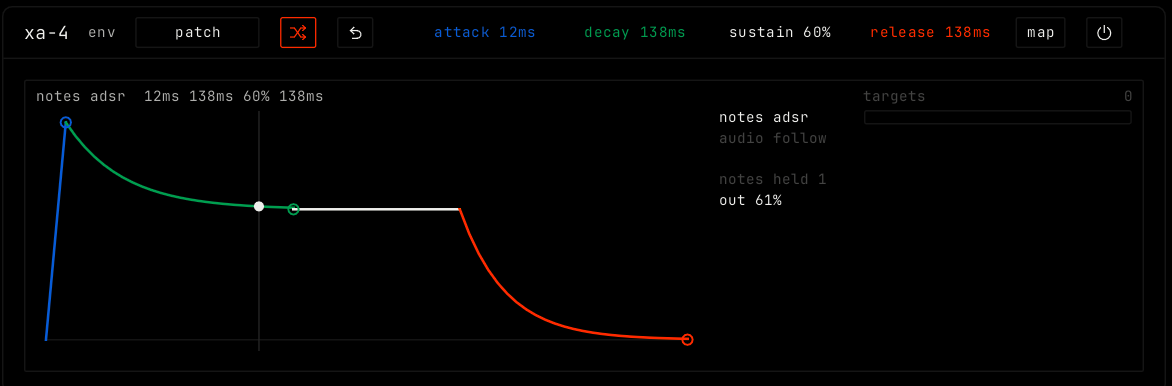
The main view shows the envelope: the blue attack slope, the green decay curve, the white sustain line and the orange release curve. Drag them. The panel on the right picks the mode, and shows how many notes are held and the current output:
- notes adsr: each note starts the envelope, and it releases after the last note ends.
- audio follow: the envelope follows the level of the channel sound. The gain parameter sets how hard the sound drives it, shown as a green trace.
The targets list shows each parameter this module moves, with its amount. Drag a row left or right to set the amount, from -100% to +100%. Double-click for +50%. Click × to remove a target. See Automation and modulation.
Parameters
| Parameter | Range / values | What it does |
|---|---|---|
| attack | 1 ms to 4 s. Default 12 ms. | How long the envelope takes to rise. |
| decay | 5 ms to 8 s. Default 138 ms. | How long it takes to fall from the top to the sustain level. |
| sustain | 0% to 100%. Default 60%. | The level it holds while a note is down. |
| release | 5 ms to 8 s. Default 138 ms. | How long it takes to fall to zero after the last note ends. |
| gain | -12 to +24 dB. Default 0 dB. | In audio follow: how hard the channel sound drives the follower. |