xw-24 modulo
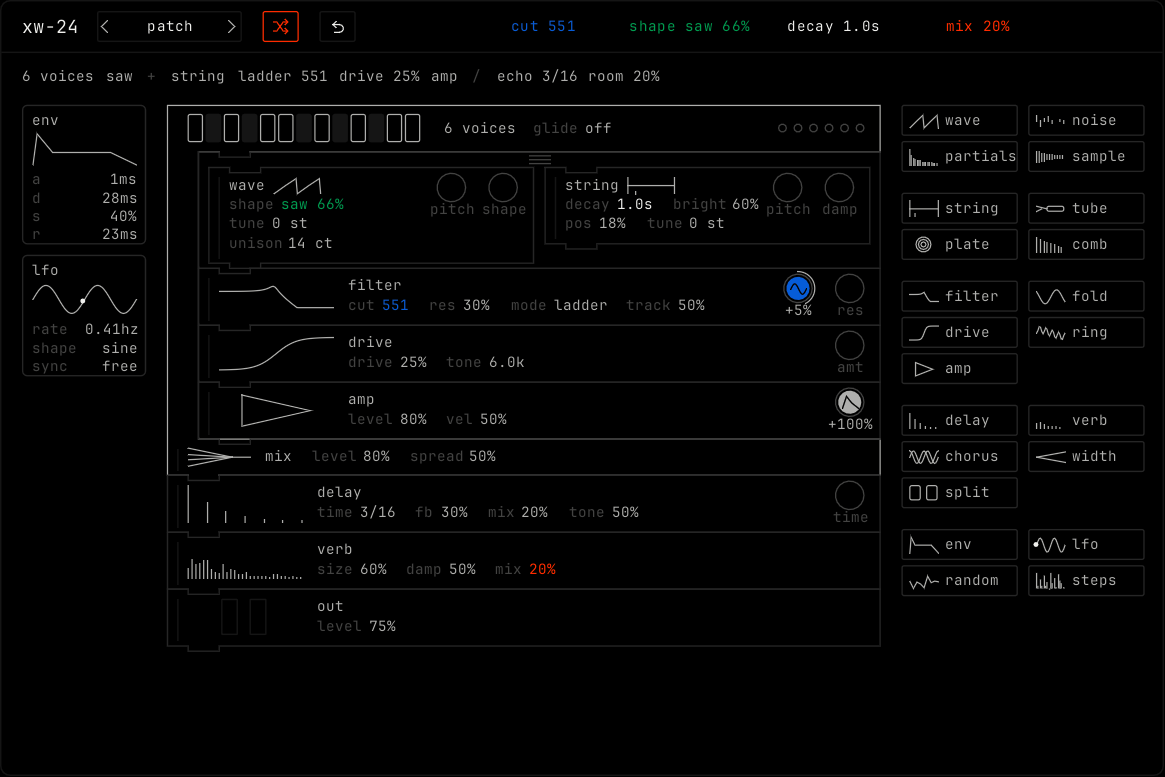
Overview
xw-24 is a synth that you build from parts. You put the parts in a stack. The order of the stack is the sound path. The sound goes from the top of the stack to the bottom.
Each part does one job. A wave makes a tone. A string rings when the sound above it plucks it. A filter makes the sound darker. You choose the parts and their order, and that is the instrument.
xw-24 has 5 presets: pluck, glass, reed, fold bass and steps. It also has 46 factory patches. Randomize builds a new instrument from rules, so each new instrument makes a sound.
Header bar
| Control | What it does |
|---|---|
| patch, random, back | The shared module buttons. The arrows step through the patches. Click the name to open the patch picker. Random builds a new instrument: new parts, a new order and new values. See The rack. |
| 4 values | Blue, green, white and orange. Each one shows a value from the stack, for example cut 551. Drag sideways to change it. Double-click to reset it. |
To put a different value on the bar, drag the value from the stack up onto one of the 4 values. The new value takes that place.
Display
The display has four parts, from top to bottom and left to right:
| Part | What it shows |
|---|---|
| Patch line | One line under the bar names the patch from its parts, for example 6 voices saw + string ladder 551 drive 25% amp / echo 3/16 room 20%. The / marks the mix. Click a word to show its block. The block flashes. |
| Modulators | A column of cards at the left. Each card shows a small picture of its shape and its values. |
| Stack | The blocks, in the order the sound goes through them. Each block has a small picture of what it does, made from its own values. Its sockets are the circles at the right. |
| Tray | All the parts at the right, in five groups. See Parts. |
The blocks also show their state:
- The line at the left edge of a block moves while sound goes through it.
- A dead block is gray. A dead block has no sound above it, so it does nothing.
- A block that you hover over, or that you just added, has a white outline.
- A plugged socket shows the color of its modulator and its depth, for example +5%.
When the stack is taller than the display, scroll it. A scrollbar shows while you scroll, then fades.
The stack
The stack always has these four blocks:
| Block | What it does |
|---|---|
| keys | The top of the stack. A row of 13 keys is one octave. Click a key to play its note. The keys light orange while notes play. voices: mono, 2, 4, 6 or 8. glide: the time to slide from one note to the next. The dots at the right are the voices. A dot is orange while its voice plays. |
| mix | Adds all the voices together. level and spread. |
| out | The bottom of the stack. level. |
The keys bracket holds the parts between keys and mix. These parts run once for each note. The parts below mix run once for all the notes together. Put effects such as delay and verb below mix.
A line at the top of the stack names the patch from its parts. Click a word in the line to show its block. The block flashes.
How the sound goes
| Part type | What it does with the sound from above |
|---|---|
| Source | Adds its own sound to the sound from above. |
| Body | The sound from above plays the body, like a pick on a string. |
| Shaper or effect | Changes the sound from above. If there is no sound above it, it does nothing and shows as dead. |
| split | Runs two columns side by side. Both columns get the same sound from above. Then the two outputs continue down together. |
Parts
The tray holds all the parts in five rows.
| Group | Part | Values |
|---|---|---|
| sources | wave | shape, tune (plus or minus 24 semitones), unison (detune, up to 40 cents) |
| noise | color (white, pink or brown), level | |
| partials | tilt, tune | |
| sample | start, len, loop (once or loop), tune | |
| bodies | string | decay, bright, pos, tune |
| tube | reed, noise, tone, tune | |
| plate | kind (membrane, bar or bell), decay, bright, tune | |
| comb | fb (feedback), damp, tune | |
| shapers | filter | cut, res, mode (ladder, lp, bp or hp), track (how much the cutoff follows the note) |
| fold | fold (1x to 12x), bias | |
| drive | drive, tone | |
| ring | ratio, mix | |
| amp | level, vel (how much velocity changes the level) | |
| space and glue | delay | time (1/16 to 1/2), fb, mix, tone |
| verb | size, damp, mix | |
| chorus | rate, depth, mix | |
| width | width (0 to 200%) | |
| split | Two columns. See How the sound goes. | |
| modulators | env | a, d, s, r |
| lfo | rate, shape, sync (free in hz, or synced from 1/16 to 4 bars) | |
| random | rate, smooth | |
| steps | rate (1/32 to 1/4) and 16 steps that you draw |
Click a part in the tray to add it. Or drag it from the tray to the place you want in the stack. To remove a part, drag it onto the tray. The stack holds up to 32 blocks.
Modulators
Modulators sit in a column at the left of the stack. You can have up to 4.
- To connect a modulator, drag its card onto a socket on a block. Each socket is a value that can move, for example the cut of a filter or the pitch of a wave.
- Drag the depth of a plug sideways to set it, from minus 100% to plus 100%. Double-click it to reset it.
- Drag a plug to another socket to move it. Drop it away from a socket to remove it.
- Drag a card onto the tray to remove the modulator.
- An env runs once for each note. So it connects only to parts in the keys bracket.
Build a sound
This makes a string sound with an echo. First, clear the keys bracket: drag each block in it onto the tray.
- Click wave in the tray. A wave goes into the keys bracket. Play a note: you hear a saw.
- Drag string from the tray to under the wave. Now the wave plays the string, and the string rings. Set the decay of the string to make the note ring longer.
- Drag filter to under the string. Drag its cut to the left to make the sound darker.
- Click env in the tray. An env card goes into the modulator column. Drag the card onto the cut socket of the filter. Drag the depth to the right. Now each note opens the filter and then closes it.
- Drag delay to under the mix. One delay now runs for all the notes together.
- Drag the time of the delay up onto the bar. Now you can change it from the bar, and automate it.
To hear what one part does, drag it onto the tray to remove it. Press cmd z to put it back.
Mouse controls
| Action | Result |
|---|---|
| Drag a value sideways | Changes it. Hold shift for small steps. |
| Double-click a value | Resets it. |
| Drag a block | Moves it in the stack. Near the top or bottom edge, the stack scrolls. |
| Draw on the steps of a steps card | Sets each step. |
| Scroll over the stack | Scrolls the stack. Scrolling never changes a value. |
You can automate every value of every block.