xg-2 gate
Overview
xg-2 is a gate. It turns the sound down when it falls under a level. A pattern of 16 steps can also cut into the open gate, from a plain gate to a full trance gate.
Header bar
| Control | What it does |
|---|---|
| patch, random, back | The shared module buttons. See The rack. |
| open, range, smooth, rhythm | The four parameters as values. Drag them, or drag in the display. |
Sidechain (sc none) | Picks a channel whose signal opens the gate. The sound of this channel still passes through. |
| Bypass (power icon) | Hear the sound without the effect. |
Display
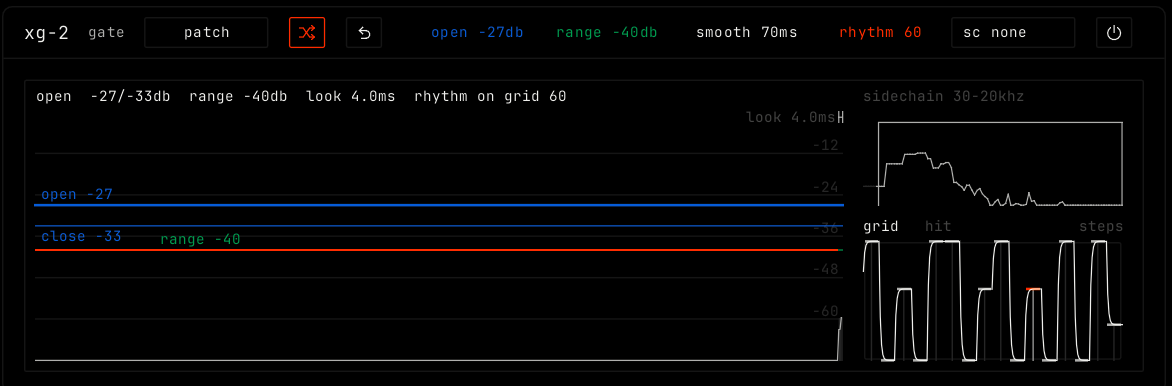
The main view shows the level over time. The gate opens above the top blue line and closes below the lower one: drag either line. The green line is the range: drag it. The top line shows the state, the open and close levels, the range and the look-ahead time.
The box at the top right sets the frequency band of the signal the gate listens to. The steps panel below it holds the 16-step pattern: click or drag to draw the steps, and scroll on them to change smooth. Pick how the steps play: grid follows the song grid. hit starts the steps again each time the gate opens, and plays them once.
Parameters
| Parameter | Range / values | What it does |
|---|---|---|
| open | -60 to 0 dB. Default -27 dB. | The level where the gate opens. It closes a few dB lower. |
| range | 0 to -80 dB. Default -40 dB. | How far the closed gate turns the sound down. |
| smooth | 10 to 310 ms. Default 70 ms. | The release of the gate, and the glide between steps, so nothing clicks. |
| rhythm | 0 to 100. Default 60. | How much the steps cut into the open gate. 0 is a plain gate. 100 is a full trance gate. |