xe-1 echo
Overview
xe-1 is an echo that follows the song tempo. Each repeat goes back through a tone filter, so the repeats change color as they fade. The ping pong button sends the repeats from side to side.
Header bar
| Control | What it does |
|---|---|
| patch, random (shuffle icon), back (arrow icon) | The shared module buttons. See The rack. |
| ping pong | Off: the repeats are in the center. On: the repeats start on the left, then go between right and left. |
| Bypass (power icon) | Turns the echo off. The dry sound passes through at full level and the repeats are muted. If you turn bypass off again before the repeats have faded, you hear the rest of them. |
Display
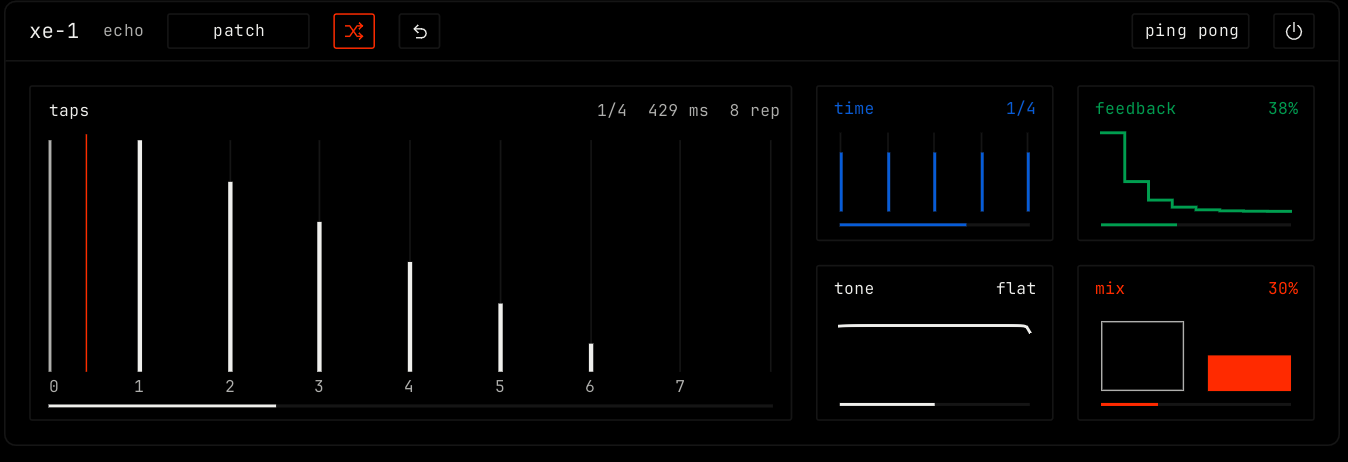
The taps view shows each repeat as a bar on a grid that is 8 beats long, with beat numbers 0 to 7. The bar height is the level of the repeat. Bars show the repeats inside the 8 beats that are louder than -48 dB. With ping pong on, left repeats are filled bars and right repeats are outlines.
An orange line marks each hit in the input and moves across the grid. A strip along the bottom shows the output level.
The line at the top right shows the note value, the delay time in milliseconds, ping pong when it is on, and the number of repeats down to about -60 dB.
Parameters
| Parameter | Range / values | What it does |
|---|---|---|
| time | 1/16, 1/8t, 1/8, 1/8d, 1/4, 1/4d, 1/2. Default 1/4. | The time between repeats, as a note value. It follows the song tempo. t is a triplet. d is a dotted note. The longest delay is 4 seconds, so 1/2 and 1/4d stop at 4 seconds at very slow tempos. |
| feedback | 0% to 95%. Default 38%. | How much of each repeat goes back in. More feedback gives more repeats. |
| tone | lp 800 … flat … hp 2.0k, in Hz. Default flat. | Left of center, a low-pass filter makes the repeats darker. Right of center, a high-pass filter makes them thinner. The filter is inside the loop, so each repeat is darker or thinner than the one before. The tile shows the filter curve. |
| mix | 0% to 100%. Default 30%. | The balance of dry sound and repeats. At 100% you hear only the repeats. |
The time tile shows the beat grid. The feedback tile shows how the repeats fall. The mix tile shows the dry and wet levels.
Notes
- The echo input is mono. The ping pong button makes the stereo image.
- When you change the tempo or the time, the delay slides to the new time.