xs-6 hush
Overview
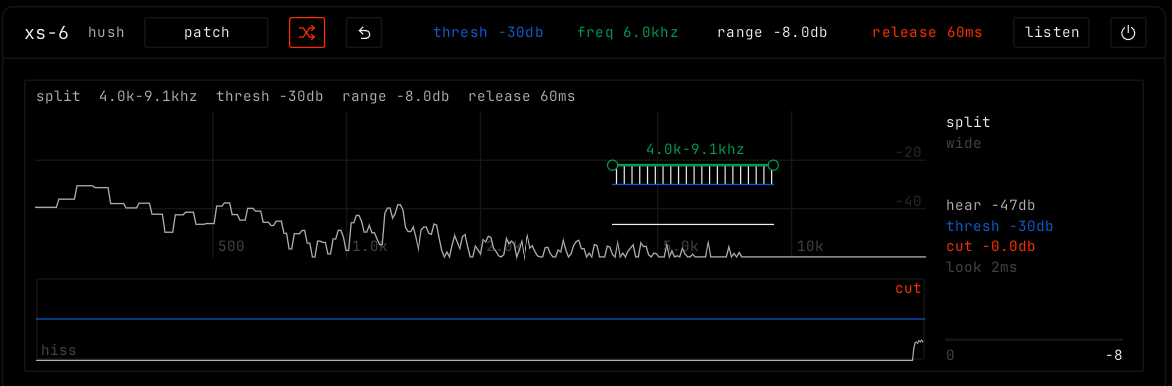
xs-6 combs hiss down. It listens to one frequency band and cuts it when it gets too loud, for example the hiss of an s in a voice.
Header bar
| Control | What it does |
|---|---|
| patch, random, back | The shared module buttons. See The rack. |
| thresh, freq, range, release | The four parameters as values. Drag them, or drag in the display. |
| listen | Hear only the band the comb listens to, to find the hiss. |
| Bypass (power icon) | Hear the sound without the effect. |
Display
The top view shows the sound by frequency, with the comb over the band it listens to. Drag the comb left or right to move the band, and up or down to move the threshold. Scroll on it to make the band wider or narrower. Drag the blue tip line for the threshold, and the green spine for the range.
The lower view shows the last seconds: white is the hiss level the comb hears, blue the threshold and orange the cut. Drag it up or down for the threshold. The panel on the right shows the current levels, and the mode. Click the mode to switch: split cuts only the band. wide turns the whole sound down while an s lasts.
Parameters
| Parameter | Range / values | What it does |
|---|---|---|
| thresh | -60 to 0 dB. Default -30 dB. | Hiss in the band that reaches above this level gets cut. |
| freq | 2 to 14 kHz. Default 6 kHz. | The middle of the band the comb listens to. |
| range | 0 to -24 dB. Default -8 dB. | The most the comb will cut. |
| release | 10 to 300 ms. Default 60 ms. | How fast the cut lets go after an s. |