xb-3 press
Type: audio effect, dynamics
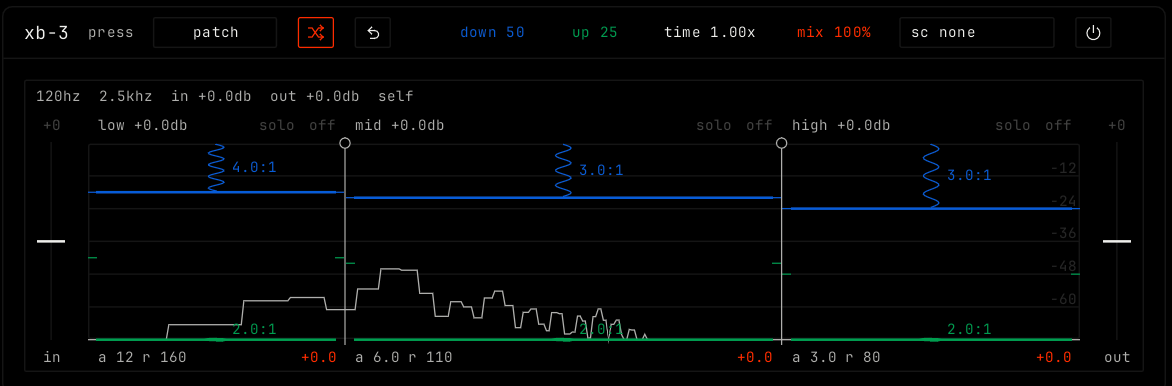 xb-3 with default settings while the song plays.
Overview
xb-3 is a compressor in three bands: low, mid and high. In each band, a top plate pushes loud sound down and a bottom plate lifts quiet sound up.
Header bar
| Control | What it does |
|---|
| patch, random, back | The shared module buttons. See The rack. |
| down, up, time, mix | The four parameters as values. Drag them. |
Sidechain (sc none) | Picks a channel whose sound drives the plates. It is split at the same frequencies, so its lows press the lows. |
| Bypass (power icon) | Hear the sound without the effect. |
Display
The display shows the three bands side by side, with the sound level in each. The top line shows the split frequencies and the input and output gain.
| Part | What it does |
|---|
| Walls | The lines between the bands. Drag a wall left or right to move the split. |
| Top line of a band | The downward threshold. Sound above it gets pushed down. Drag up or down. |
| Bottom line of a band | The upward threshold. Sound below it gets lifted. Drag up or down. |
| Springs | The downward and upward ratios, shown as 4.0:1. Drag up for stiffer. Scroll works too. |
a / r under a band | Attack and release of the band, in ms. Drag left or right. |
| Band gain | Drag the band up or down. Double-click to reset it. |
| solo / off | Hear only the soloed bands, or let a band pass untouched. |
| in / out | Gain before and after the press. Drag up or down. Double-click for 0 dB. |
Parameters
| Parameter | Range / values | What it does |
|---|
| down | 0 to 100. Default 50. | How hard the top plates push loud sound down in every band. 0 turns the downward part off. |
| up | 0 to 100. Default 25. | How hard the bottom plates lift quiet sound in every band. 0 turns the upward part off. |
| time | 0.25x to 4x. Default 1x. | Makes every attack and release slower or faster at once. 1x uses the times of each band. |
| mix | 0% to 100%. Default 100%. | The pressed sound against the plain sound. |