xl-6 lfo
Overview
xl-6 is an lfo. It does not change the sound. It moves other parameters on the same channel in a cycle.
Header bar
| Control | What it does |
|---|---|
| patch, random, back | The shared module buttons. See The rack. |
| rate, depth, phase, smooth | The four parameters as values. Drag them, or drag in the display. |
| map | Click, then click a parameter of any module on this channel to add it as a target. You can also drag from map onto the parameter. |
| Bypass (power icon) | Stops moving the targets. They go back to where you set them. |
Display
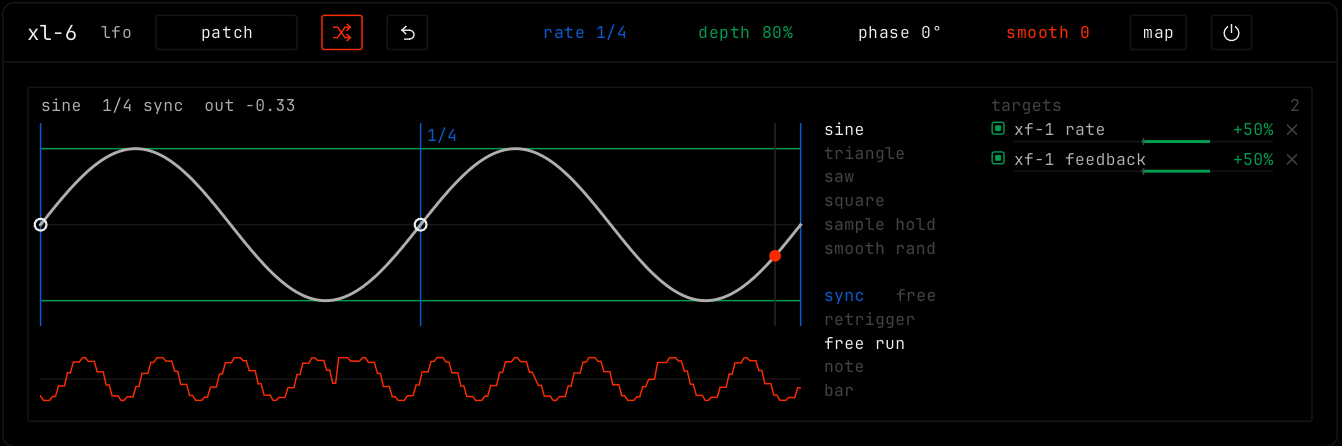
The main view shows the wave. The blue lines mark one cycle. The white dot is the phase: drag the curve left or right. Drag the curve up or down for depth. The orange line under it is what the targets get, after smooth. The top line shows the shape, the rate and the current output.
The list next to the wave picks the shape: sine, triangle, saw, square, sample hold or smooth rand. Under it, pick sync or free, and when the wave starts again: free run, note or bar.
The targets list shows each parameter this module moves, with its amount. Drag a row left or right to set the amount, from -100% to +100%. Double-click for +50%. Click × to remove a target. See Automation and modulation.
Parameters
| Parameter | Range / values | What it does |
|---|---|---|
| rate | With sync: 1/32 to 8 bars, each with triplet (t) and dotted (d) values. Default 1/4. Free: 0.02 to 20 Hz. | How fast the wave turns. |
| depth | 0% to 100%. Default 80%. | How far the wave swings. Each target moves by its amount times this. |
| phase | 0° to 360°. Default 0°. | Where the wave starts in its cycle after a restart. |
| smooth | 0 to 100. Default 0. | Rounds the corners of the wave, so steps glide. |