xc-4 chord
Overview
xc-4 plays a chord from one key. It can fit every chord into a key, spread the voices, and strum them.
Header bar
| Control | What it does |
|---|---|
| patch, random, back | The shared module buttons. See The rack. |
| shape, key, spread, strum | The four parameters as values. Drag them, or drag in the display. |
| Bypass (power icon) | Plays the notes straight. |
Display
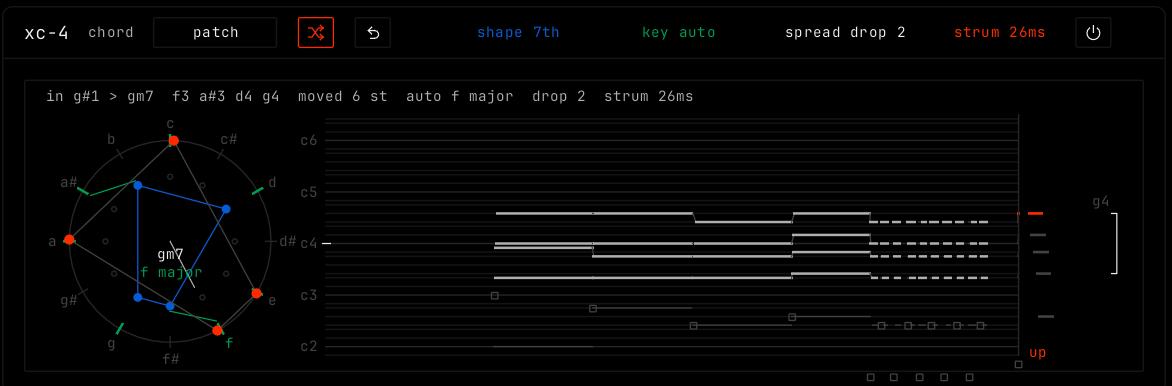
The circle at the left shows the twelve notes. The inner blue ring is the chord shape: click a note to add or remove it, or drag up or down for the presets. The outer green ring is the key: turn it to change the tonic. The center shows the chord name and the key. The roll on the right shows the voices as they play: drag it left or right for spread, and up or down to move the home register. Drag the now column at the right for strum. The top line shows the note in, the chord out, and the key, spread and strum.
Parameters
| Parameter | Range / values | What it does |
|---|---|---|
| shape | 5, triad, sus2, sus4, 7th, add9, 9th, 6/9 or quartal. Default 7th. memory when you edit the notes. | The stored chord that one key plays. |
| key | free, auto, major, minor, dorian, mixo, lydian, phryg or harm min. Default auto. | Free plays the shape on any note. Auto finds the key from the notes that come in. A mode bends every chord into that scale. |
| spread | close, drop 2, drop 3, drop 2+4 or wide. Default drop 2. | The voicing: how far apart the notes of the chord are. |
| strum | 0 to 160 ms. Default 26 ms. | The time from the first voice to the last. Down on the beat, up off the beat. |