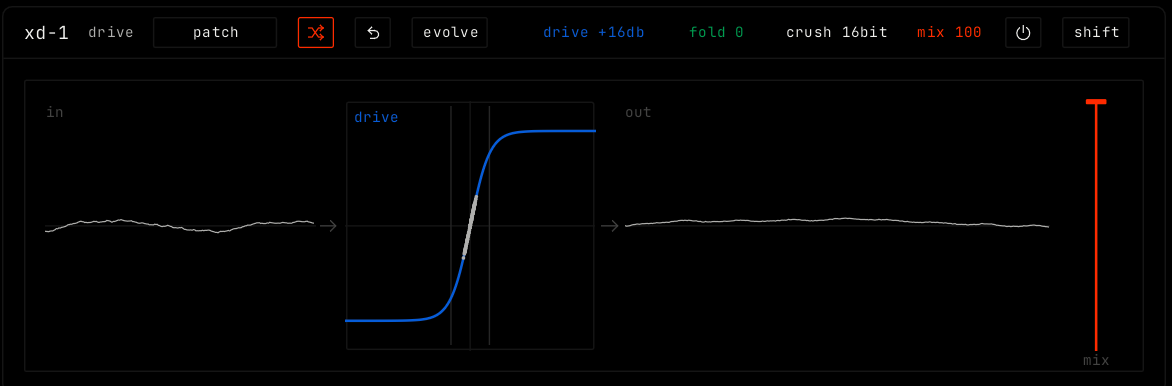
xd-1 is a distortion, from soft to hard. The sound hits a drive curve. Loud parts can fold back down instead of clipping flat, and a crusher can lower the bits and the sample rate.
The four parameters as values. Drag them, or drag in the display.
Bypass (power icon)
Hear the sound without the effect.
shift
Opens the shift layer. See below.
Display
The display shows the input wave at the left, the drive curve in the middle and the output wave at the right. Drag the curve up or down for drive, and left or right for fold. Drag the output up or down for crush. Drag the orange bar for mix.
Parameters
Parameter
Range / values
What it does
drive
+0 to +36 dB. Default +16 dB.
How hard the sound hits the curve.
fold
0 to 100. Default 0.
Loud parts fold back down instead of a flat clip.
crush
16 bit down to 3 bit. Default 16 bit.
Fewer bits and a lower sample rate.
mix
0 to 100. Default 100.
Dry sound to driven sound.
Shift layer
Cell
Rows
tone
top: the highest frequency of the driven sound, 1 to 20 kHz.
clean lows
under: the lows under this frequency stay clean. off drives everything.
dynamic
amount: how much the level of a signal moves the drive. from: the input, or click to pick another channel as a sidechain.
tilt
in and out: tilt the sound before and after the drive, up to 6 dB per octave. flat in the center.
stereo
drive: both sides, the center or the sides.
pressure
adds drive: key pressure adds drive. level: matched keeps the output level near the input level; as is does not.