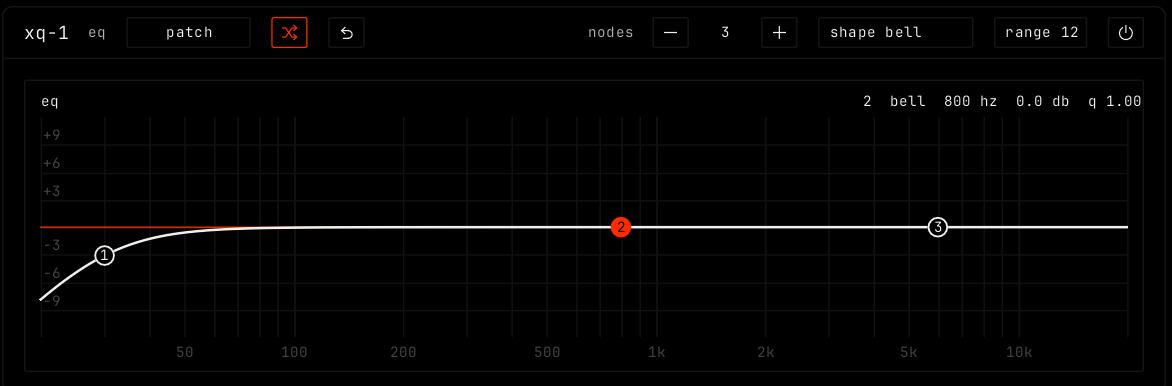
xq-1 is an equalizer. Each node boosts or cuts a part of the spectrum. A new xq-1 has three nodes: a low cut at 30 Hz, a bell at 800 Hz and a smooth high step at 6 kHz.
The number of nodes. - removes the selected node. + adds a node in the widest gap.
Shape (for example shape bell)
The shape of the selected node. Click it to change the shape. See the table below.
range
How many dB the graph shows above and below 0: 6, 12 or 24. Click to change. Default 12.
Bypass (power icon)
Hear the sound without the effect.
Display
The graph shows the curve of all nodes over the spectrum of the sound, from 20 Hz to 20 kHz. The top line shows the selected node: its number, shape, frequency, gain and width (q).
Action
Result
Drag a node
Moves it: left and right for frequency, up and down for gain. Hold shift for fine moves.
alt drag, or scroll
Changes the width of the node.
Double-click
Adds a node, or resets the node under the mouse.
Right-click a node
Picks its shape.
Node shapes
Shape
What it does
bell
Boosts or cuts around the node.
notch
A narrow, deep cut at the node.
ramp up / ramp down
Cuts below / above the node, 12 dB per octave.
hard cut up / hard cut down
Cuts below / above the node, 48 dB per octave.
bezier up / bezier down
A smooth step at the node. The highs / lows move with the gain.