Inverts the feedback, for a hollow, metallic sound.
Bypass (power icon)
Hear the sound without the effect.
shift
Opens the shift layer. See below.
Display
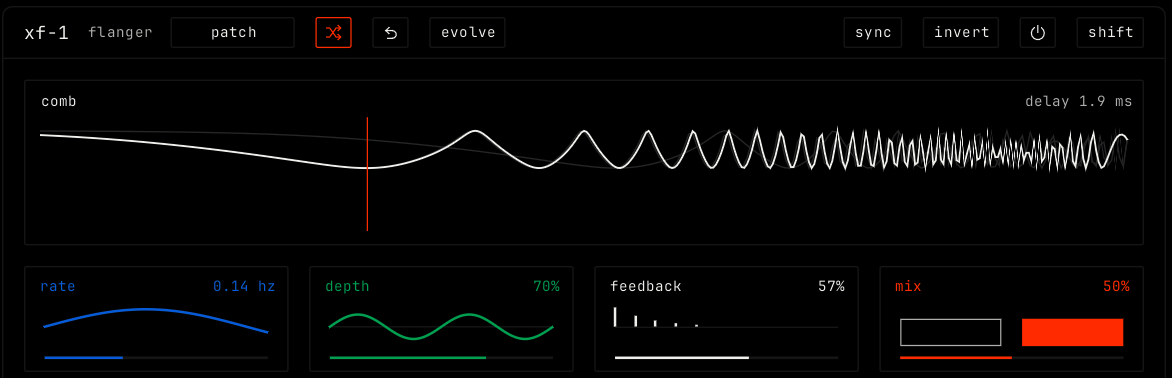
The comb view shows the comb filter that the delay makes, with the delay time at the top right. Drag it left or right to move the center delay, from 0.5 to 10 ms. Double-click to reset. Each tile shows its own picture: the lfo for rate, the sweep for depth, the repeats for feedback and the dry and wet levels for mix.
Parameters
Parameter
Range / values
What it does
rate
0.02 to 5 Hz. Default 0.14 Hz. With sync: 1/16, 1/8, 1/4, 1/2, 1 bar, 2 bars, 4 bars or 8 bars.
How fast the sweep moves.
depth
0% to 100%. Default 70%.
How far the sweep moves around the center delay.
feedback
0% to 95%. Default 57%. Shown negative when invert is on.
How much of the output goes back in. More feedback gives a stronger ring.
mix
0% to 100%. Default 50%.
The balance of dry sound and flanged sound.
Shift layer
Cell
Rows
shape
lfo: sine, triangle, ramp up or ramp down.
sweep
starts: free, on the bar, or on each note.
mode
moved by: the lfo, each hit, or the notes.
through zero
tape jet: on or off. The sweep passes through zero delay, like two tape machines.
freeze
hold sweep: on or off. Stops the sweep where it is.
width
left to right: the phase offset between the left and right sweeps, 0 to 180 degrees.