xn-2 chip
Overview
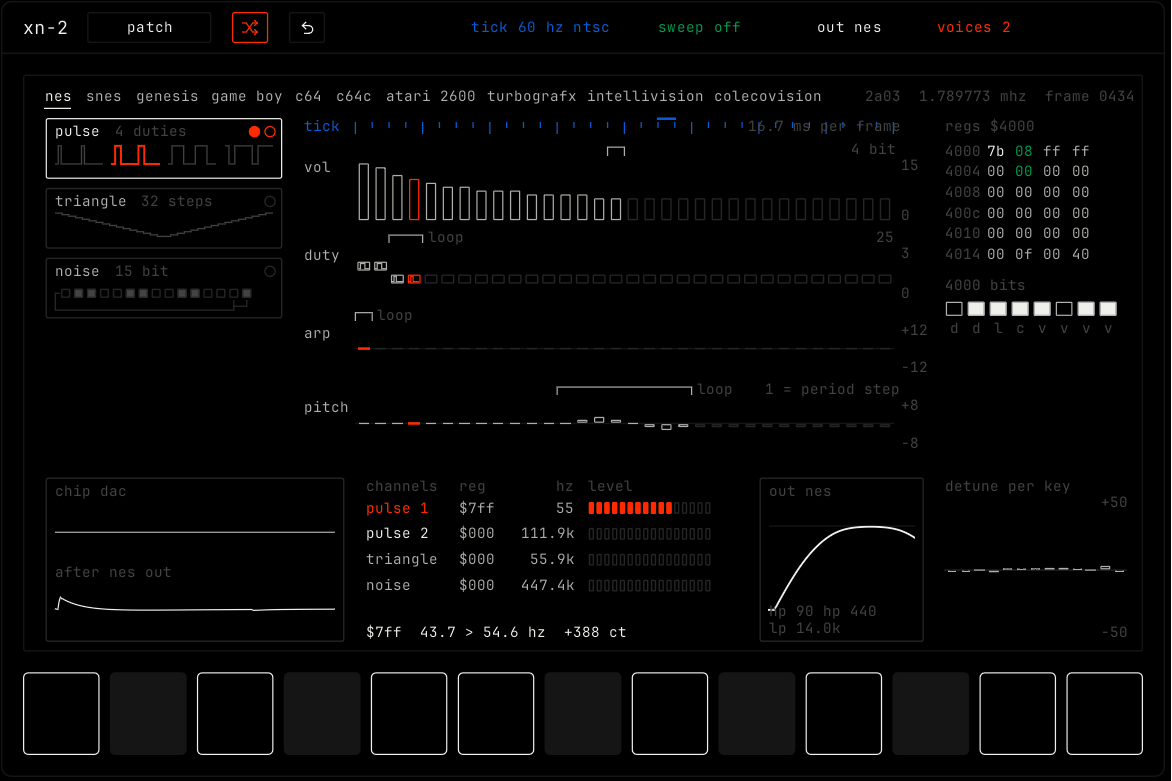
xn-2 models the sound chips of classic game consoles and home computers. Pick a chip and a channel of that chip, then draw how its volume, duty, notes and pitch move on each tick.
Header bar
| Control | What it does |
|---|---|
| patch, random, back | The shared module buttons. Random picks a new chip and channel and draws new tables for them. See The rack. |
| tick | How often the tables step, in Hz. 60 is NTSC, 50 is PAL. Double-click for the rate of the chip. |
| tone | A sound feature of the chip itself. What it does depends on the chip: the sweep on nes, the echo on snes, the vibrato on genesis, the pan on game boy and turbografx, the filter cutoff on c64, the mixing on atari 2600, the noise on intellivision and colecovision. |
| out | The analog output stage of the console after the chip. Full is the real console. Raw is the bare chip output. |
| voices | How many of the real channels of the chip this instrument may use. |
Display
- The top row lists the chips: nes, snes, genesis, game boy, c64, c64c, atari 2600, turbografx, intellivision and colecovision. Click one to pick it. The right side shows the chip name, its clock and the current frame.
- The list on the left shows the channel types of the chip, for example pulse, triangle and noise. Click one to use it. For a pulse channel, the dots pick the duty.
- The tables in the middle hold one value for each tick: vol (volume), duty, arp (note steps) and pitch. Click or drag to draw them. Each table has a loop marker: the part after it repeats while the note is held.
- The register panel shows the values sent to the chip.
- The bottom panels show the chip channels with their levels, the output curve, and the detune of each key.
The row of 13 keys at the bottom is one octave. The keys light while notes play. Press a key to play its note.