xd-8 drums
Overview
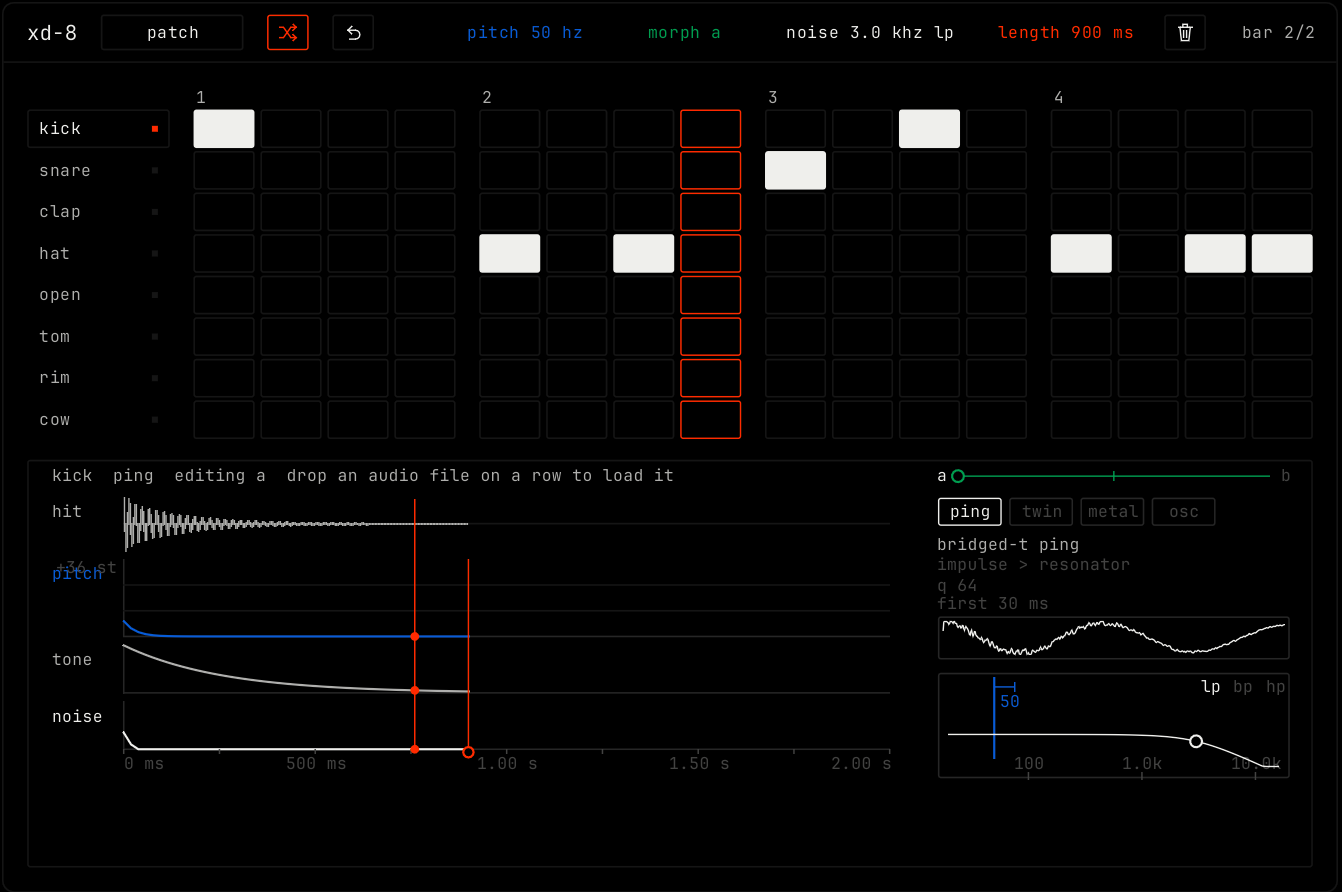
xd-8 is a drum machine with 8 synthetic voices: kick, snare, clap, hat, open hat, tom, rim and cowbell. It holds two kits, a and b, and morphs between them. Any voice can play a sample instead.
Header bar
| Control | What it does |
|---|---|
| patch, random, back | The shared module buttons. Random makes a new kit: both kits, every voice and the morph. Samples you dropped stay on their pads. |
| pitch | The base pitch of the selected voice. It moves the blue line in the editor. |
| morph | Blends every setting of kit a into kit b. Shows morph a, a percentage, or morph b. |
| noise | The filter frequency of the noise of the selected voice. It moves the white dot. |
| length | How long the selected hit lasts. It moves the orange end line. |
| Clear row (trash icon) | Removes the hits of the selected voice from the clip. |
bar 1/2 | Which bar of the clip the grid shows, and how many bars the clip has. |
Step grid
The grid shows one row for each voice and one column for each step of the bar that plays. Lit cells are hits. The playing step is outlined.
| Action | Result |
|---|---|
| Click a voice name | Plays it and selects it for the editor. |
| Click a cell | Adds or removes a hit in the clip. |
| Drag across cells | Paints hits on or off, the same way as the first cell. |
| Drop an audio file on a row | Loads the file as the sample of that voice. |
Voice editor
The editor under the grid shows the selected voice. The top line shows the voice, its model and which kit you edit: editing a when morph is closer to a, editing b when it is closer to b.
- The hit lane shows the sound. The pitch, tone and noise lanes show how each part changes over time, from 0 to 2 s. Drag them to shape the voice. The orange line is the length.
- The slider at the top right is the morph between a and b.
- The model buttons pick how the voice makes sound: ping (a short impulse into a resonator), twin (two resonators and filtered noise), metal (a stack of square waves) or osc (an oscillator). A voice with a sample uses the sample model, with the file name and length.
- The box at the bottom right is the noise filter: lp, bp or hp, with its frequency.