xa-1 arpeggiator
Overview
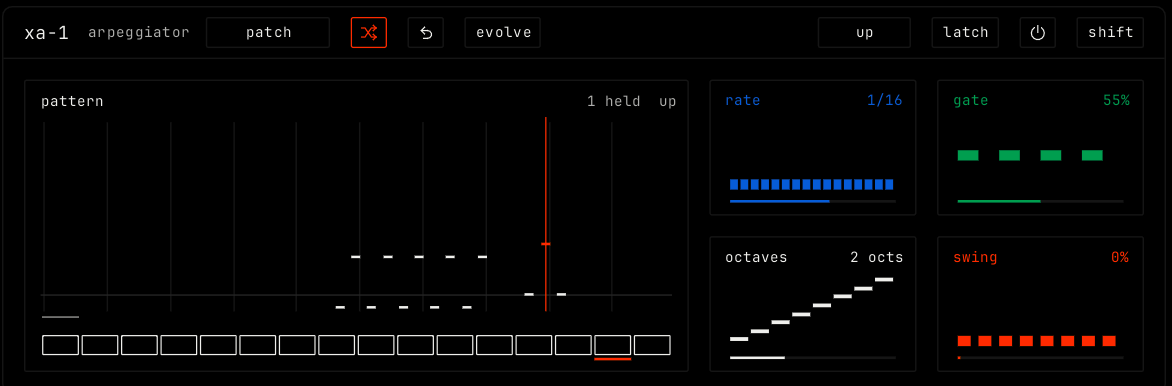
xa-1 is an arpeggiator. It plays the notes you hold as a pattern, in time with the song.
Header bar
| Control | What it does |
|---|---|
| patch, random, back, evolve | The shared module buttons. See The rack. |
| Pattern (for example up) | The order of the notes: up, down, up down, random, played, converge, diverge or chord. Click or scroll to change it. |
| latch | The notes keep playing after you let go, until the next chord. |
| Bypass (power icon) | Notes pass through without the arpeggiator. |
| shift | Opens the shift layer. See below. |
Display
The pattern view shows the notes as they play, over a row of steps. The orange line is the current step. The top right shows how many notes are held and the pattern. Each step can be a rest, on, or an accent; pick a step and set it in the shift layer.
Parameters
| Parameter | Range / values | What it does |
|---|---|---|
| rate | 1/4, 1/8, 1/8 t, 1/16, 1/16 t or 1/32. Default 1/16. | The length of each step. |
| gate | 10% to 100%. Default 55%. | How long each note plays, as a part of the step. |
| octaves | 1 to 4. Default 2. | How many octaves the pattern spans. |
| swing | 0% to 100%. Default 0%. | Pushes every second step late. |
Shift layer
| Cell | Rows |
|---|---|
| step | For the selected step: octave (-1 to 2, click to step), tie to the next step, ratchet (x1 to x4 repeats) and chance. |
| pattern | length in steps. clear sets every step back to on. |
| groove | swing: click to pick a groove. |
| pressure | changes: the rate or the gate. amount: how much key pressure changes it. |
| song | lock to bar: on or off. The pattern starts with the bar. |
| to a clip | bars: how many bars. make: writes the arpeggio as notes into a new clip. |