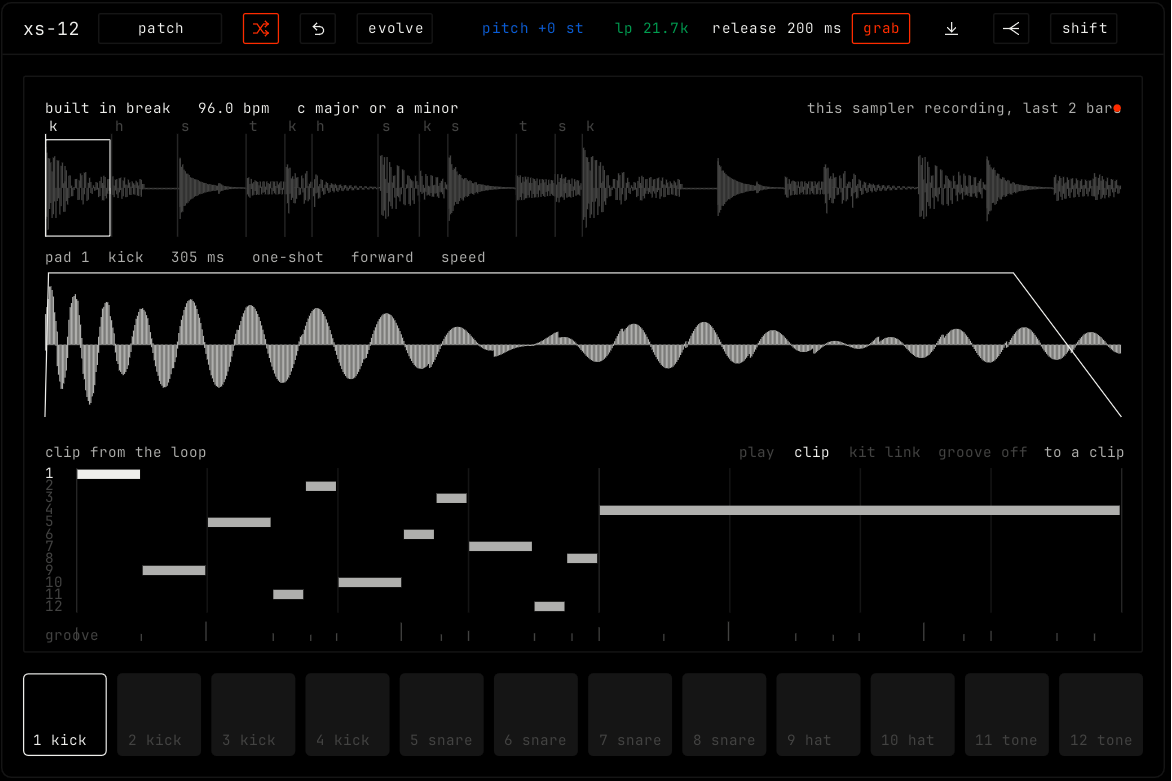
xs-12 slices a loop at its hits and puts the slices on 12 pads. It sorts the pads into kick, snare, hat and tone, and writes the loop as a clip of notes, so you can play and change it.
| Control | What it does |
|---|
| patch, random, back, evolve | The shared module buttons. Random gives every pad a new pitch, filter, direction and pan. See The rack. |
| pitch | The pitch of the selected pad, in semitones. In stretch mode the length stays the same. |
Filter (for example lp 21.7k) | The filter of the selected pad. |
| release | The release of the selected pad. |
| grab | Takes the last bars that played on this channel, then slices them. |
| Load (arrow icon) | Loads a sound. You can also drop one on the sampler. |
| Multi out (icon) | Gives each pad its own channel. See multi out. |
| shift | Opens the shift layer with every other control for the selected pad. See below. |
| Cell | Rows |
|---|
| envelope | The volume envelope of the pad. |
| pitch | semitones, cents, how: speed or stretch, timbre. |
| filter | The filter of the pad, with res and env. |
| loop | kind: off, forward or ping-pong. crossfade. |
| mix | gain, pan, crush. |
| velocity | to level, to filter, to start. |
| play | direction: forward, reverse, ping-pong, ratchet or tape stop. ratchets. |
| slice | Slice the loop by transient, by beat grid or by role. |
| warp | warp the loop to the song tempo, and move it to key. |
| groove | Use the timing of the loop in the player, or add it to the groove pool. |
| always recording | source: what the sampler records all the time, for grab. |