xm-128 flats
Overview
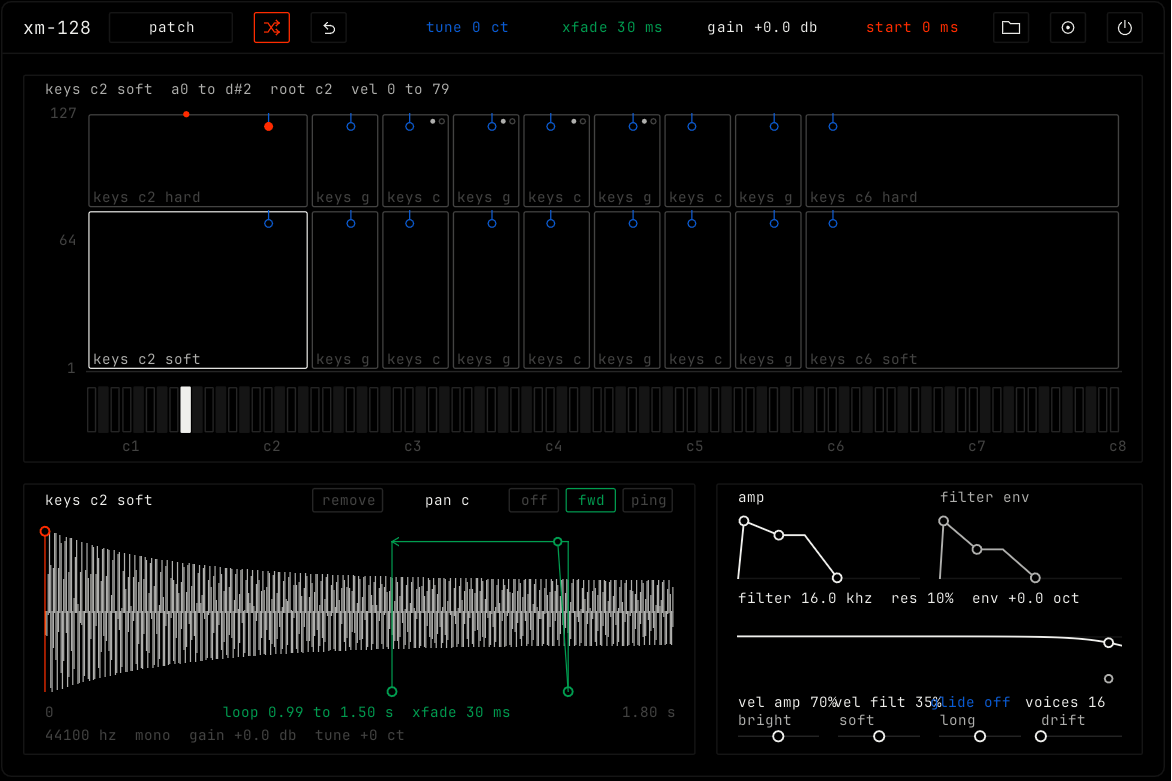
xm-128 is a multisampler. Each recording lives in a flat: a block on a map of keys (across) and velocity (up). It loads audio files or an sfz file, and plays round-robin takes.
Header bar
| Control | What it does |
|---|---|
| patch, random, back | The shared module buttons. Random gives new envelopes, filter, velocity, glide, macros, pan spread, starts and loops; the map and the recordings stay. See The rack. |
| tune | Fine pitch of the selected flat, in cents. |
| xfade | How long the loop end blends into the loop start. It moves the green ramp. |
| gain | The level of the selected flat. |
| start | Where the selected flat starts to play. It moves the orange line. |
| Load (folder icon) | Picks audio files or one sfz file. You can also drop files. Note names or numbers in the file names (c3, a#2, db4, 60) set the keys. Velocity words (pp, mf, ff, v1) set the layers. |
| Init (icon) | The built-in keys and plain settings. |
| Bypass (power icon) | Hear the plain recordings, with no envelope, filter, velocity, glide or macros. |
The map
The top view is the map. The top line shows the selected flat: its name, key range, root and velocity range.
| Part | What it does |
|---|---|
| Flat | One recording. Click it to pick it and play that key at that velocity. |
| Lamp | The root key of the flat, where the recording plays at its own pitch. Drag it sideways. |
| Wall | The key edge of a flat. Drag it. A wall shared with the next flat moves both. |
| Floor | The velocity edge of a flat. Drag it up or down. A floor shared with the next flat moves both. |
| Take dots | The round-robin takes of the flat. The filled dot plays next. Click a dot to edit that take. |
| Keys | The strip under the map. Click to play. Lower on a key is louder. |
The selected flat
The lower left view shows the wave of the selected flat.
| Control | What it does |
|---|---|
| off / fwd / ping | The loop: play once to the end, repeat from loop start to loop end, or play the loop forward and then back. |
| Loop markers | Drag the loop start and loop end. The green ramp is the crossfade. |
| pan | Drag left or right. Double-click for center. |
| remove | Takes this flat out of the map. |
The bottom line shows the sample rate, the channels, the gain and the tune.
Sound
The lower right view holds the settings for the whole instrument.
| Control | What it does |
|---|---|
| amp | The volume envelope. |
| filter env | The filter envelope. Drag sideways for how far it opens the filter, in octaves. |
| Filter | Drag sideways for cutoff, up and down for resonance. Double-click to reset. |
| vel amp / vel filt | How much louder / brighter a harder note is. |
| glide | Each note slides from the pitch of the note before. Double-click for off. |
| voices | How many notes sound at once. |
| bright, soft, long, drift | Macros. Bright opens the filter and the filter env. Soft gives a slower attack and more velocity to level. Long gives a longer decay and release and more sustain. Drift puts each note a little off in pitch, pan and start. |