xv-1 reverb
Overview
xv-1 puts a room or a hall around the sound. It uses a built-in room, or an impulse file that you load.
Header bar
| Control | What it does |
|---|---|
| patch, random, back | The shared module buttons. See The rack. |
| Load (folder icon) | Loads an impulse file. You can also drop a file on the module. |
| Clear (trash icon) | Goes back to the built-in room. |
| Freeze (snow icon) | Holds the reverb tail forever. The decay shows inf. |
| Bypass (power icon) | Hear the sound without the effect. |
Display
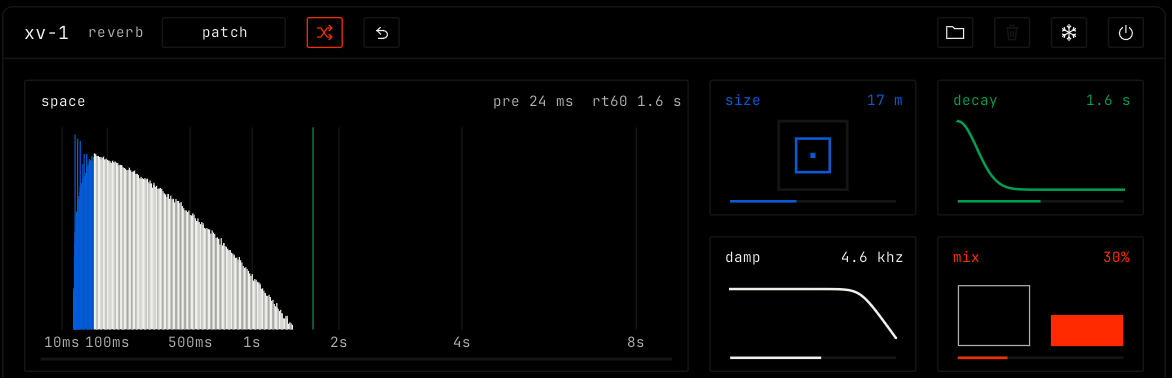
The space view shows the reverb tail over time, from 10 ms to 8 s. The line at the top right shows the pre-delay and the decay time (rt60). With an impulse file, the view shows its name.
Parameters
| Parameter | Range / values | What it does |
|---|---|---|
| size | 2 to 40 m. Default 17 m. | The size of the room. A bigger room also has a longer pre-delay, up to 60 ms. With an impulse file, size stretches the file instead, shown as a factor. |
| decay | 0.3 to 9 s. Default 1.6 s. | How long the reverb takes to fade. |
| damp | 1 to 16 kHz. Default 4.6 kHz. | Where the highs of the tail roll off. Lower values give a darker tail. |
| mix | 0% to 100%. Default 30%. | The balance of dry sound and reverb. |