xc-1 compressor
Overview
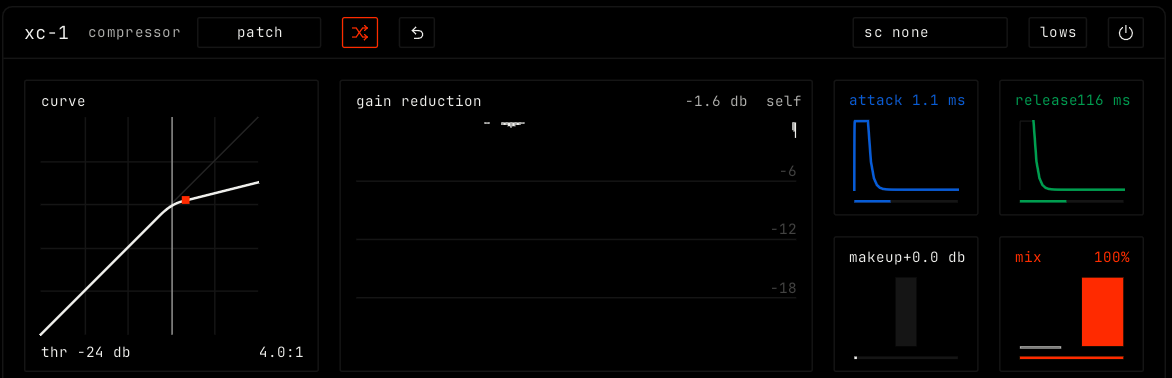
xc-1 is a compressor. It evens out the loud and soft parts of the sound. Another channel can drive it, for sidechain ducking.
Header bar
| Control | What it does |
|---|---|
| patch, random, back | The shared module buttons. See The rack. |
Sidechain (sc none) | Picks a channel whose signal drives the effect instead of this channel. It shows the channel name when one is picked. |
| lows | The sidechain listens only below 150 Hz, so a kick drives it and hats do not. |
| Bypass (power icon) | Hear the sound without the effect. |
Display
The curve view shows the input level against the output level. Drag left or right for the threshold, and up or down for the ratio. Double-click to reset. The threshold shows at the bottom left and the ratio at the bottom right. The gain reduction view shows how much the level goes down over time, and which signal drives it: self or the sidechain channel.
Parameters
| Parameter | Range / values | What it does |
|---|---|---|
| threshold | -60 to 0 dB. Default -24 dB. | The level where compression starts. Set it in the curve view. |
| ratio | 1:1 to 20:1. Default 4:1. | How much the level over the threshold goes down. Set it in the curve view. |
| attack | 0.1 to 100 ms. Default 1.1 ms. | How fast the compressor reacts. |
| release | 20 ms to 1 s. Default 116 ms. | How fast it lets go. |
| makeup | +0 to +24 dB. Default +0 dB. | Gain after compression. |
| mix | 0% to 100%. Default 100%. | Dry sound to compressed sound. Lower values give parallel compression. |