xk-1 scale
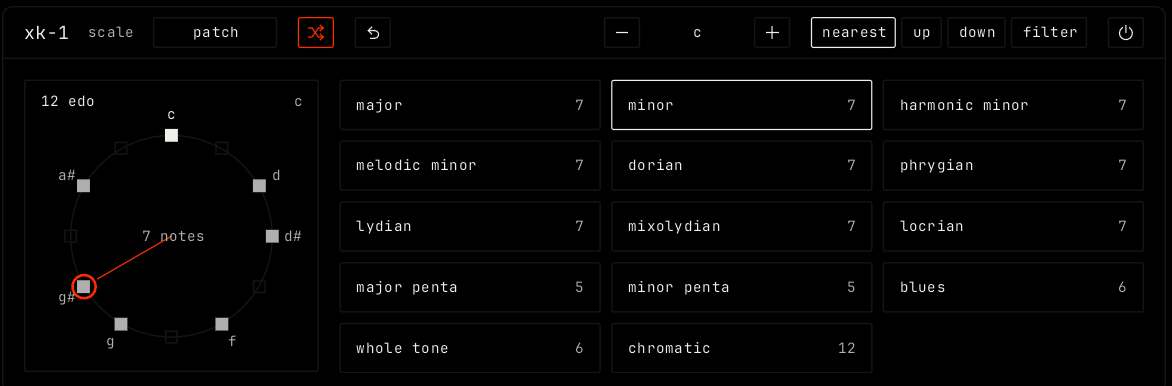
Overview
xk-1 keeps notes in a scale. Notes outside the scale move to a scale note, or are dropped. It works in the tuning of the clip, also in microtonal tunings. On an instrument that is not pitched, such as drums, notes pass through.
Header bar
| Control | What it does |
|---|---|
| patch, random, back | The shared module buttons. See The rack. |
| - / root / + | The root of the scale. - and + move it one step down or up. |
| nearest | Moves notes outside the scale to the nearest scale note. |
| up | Moves them up to the next scale note. |
| down | Moves them down to the next scale note. |
| filter | Drops notes outside the scale. |
| Bypass (power icon) | Notes pass through unchanged. |
Display
The circle shows every step of the tuning, with the scale notes lit. Click a step to add it to the scale or remove it. The center shows how many notes the scale has, and the top left the tuning, for example 12 edo. The grid on the right lists scales for the tuning: click one to use it. For 12 steps they are major, minor, harmonic minor, melodic minor, dorian, phrygian, lydian, mixolydian, locrian, major penta, minor penta, blues, whole tone and chromatic. Other tunings have their own lists.
Parameters
xk-1 has no parameter tiles. Its settings are the root, the mode and the scale.